
Exploring new tools in the financial world can broaden horizons, and today brings a closer look at Binariun, a promising broker. The focus is on enhancing the trading experience, and Binariun offers a range of financial assets, including currency pairs and cryptocurrencies. Users can seamlessly add and customize the list of assets they wish to trade, enhancing personalized trading strategies. Additionally, there’s the option to arrange charts in multiple layouts, allowing simultaneous examination of up to four trading pairs. This multi-graph setup supports strategic comparisons and decision-making.
What sets Binariun apart is its integration of Trading View quotes, a well-regarded feature among traders worldwide. This broker ensures a familiar and exact trading experience by aligning itself with a trusted quote provider. Users can choose from diverse account funding methods, offering significant flexibility. This, coupled with educational resources and trading signals, creates an environment where traders can thrive and refine their skills with ease. A straightforward interface further enables traders to navigate this dynamic platform effectively.
Key Takeaways
- Binariun provides multi-graph chart layouts for enhanced trading.
- Trading View integration offers reliable quotes.
- Diverse account funding options enhance user convenience.
Summary of Binariun Broker
Binariun Broker offers a diverse range of trading options. The platform includes currency pairs, cryptocurrencies, commodities, indexes, and stocks. Traders can select from these categories based on their preferences. One feature allows users to customize their view using a screen split, facilitating simultaneous trading on multiple assets.
By incorporating TradingView quotations, the broker allows traders to match these with their platform for accuracy. The user interface provides various tools such as user profiles, deposit options, and trade history tracking. It offers numerous deposit methods including credit cards and cryptocurrencies, ensuring flexibility for users around the globe.
There is an educational section featuring strategies and a calendar of upcoming events, helping traders stay informed and strategize effectively. Additionally, an integrated leaderboard highlights top trader signals, contributing to an interactive community environment.
Financing the Account
Starting Investment
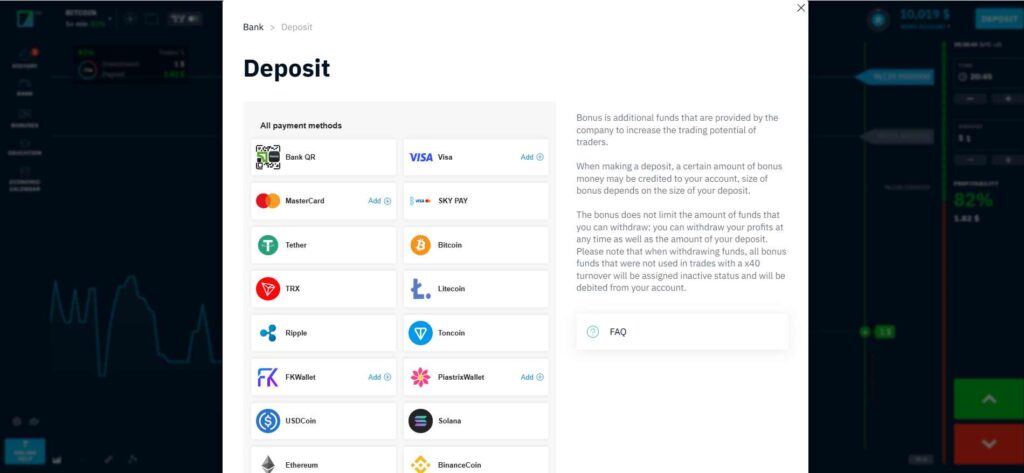
In the user’s profile, there is an option labeled “Refill” which allows users to add funds to their account. While interacting with this feature, it becomes evident that there are numerous options for adding money. For instance, the minimum amount that can be added is fixed at 60 rubles.
Approaches for Adding Funds
A variety of methods are available for users to fund their accounts. These options include prevalent choices like the Visa and MasterCard systems, alongside other services such as Skypay and Bekart that provide card services. Additionally, cryptocurrencies are accepted, and several digital wallets like Past FK Wallet are also supported.
Features of the Trading Platform
Binarium Currency Selections and Digital Assets
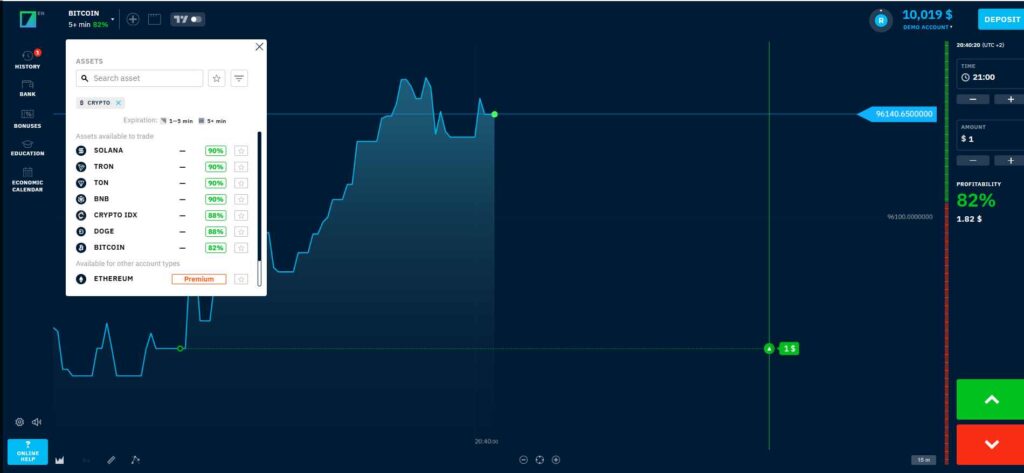
The trading platform provides a broad array of currency pairs and digital currencies for trading. Users can select from traditional forex pairs like Euro-Dollar or shift their focus to cryptocurrencies, creating a versatile trading environment.
Options for Asset Organization
For easier navigation, the platform offers tools to organize and prioritize assets. By applying certain filters, users can customize which currency pairs and cryptocurrencies show up as favorites. This feature supports quick access to preferred trading options.
Differences in Pair Percentages
Not all currency pairs offer the same percentage returns. There are noticeable variations in the returns for different pairs at various time intervals. While some have a minimal difference in percentages, others can vary significantly, providing diverse trading conditions.
Rapid Addition of Trading Assets
Adding new trading pairs is simplified through a convenient “plus” icon. This allows traders to rapidly incorporate new currency pairs or switch existing ones, enhancing trading efficiency without needing multiple screens.
Trading View Connection
Viewing Trading View Market Data
The platform provides an option to access Trading View market data through a specialized feature. Users click a designated button to activate Trading View quotes. This integrates Trading View’s tools and quotes seamlessly into the broker’s interface, enabling users to trade directly within the platform. The process of switching between different quotes is straightforward, and traders can easily compare market data with another set to verify consistency.
Comparing Broker and Trading View Data
It is possible for traders to analyze Trading View quotes alongside those provided directly by the broker. Both sets of market data can be viewed on the same platform, allowing users to confirm their alignment. This side-by-side comparison benefits those who rely heavily on Trading View for their analysis by reinforcing confidence in the data’s reliability. The accessibility of these features ensures that traders can confidently engage without needing multiple screens or systems.
Multiple Graph Arrangement
Variable Display for Different Graphs
Binary options brokers often allow users to configure their view to accommodate more than one trading graph at a time. When using such platforms, you may find a button or feature that enables dividing your screen into multiple sections. For example, a trader can select between displaying one, two, three, or even four graphs simultaneously. This division is particularly useful for monitoring several currency pairs at the same time, thereby enhancing trading efficiency without needing additional monitors.
Tailored Settings for Each Graph
On these platforms, individual graphs can be customized to display specific data or formats, such as changing currency pairs or graph styles. Traders might choose different configurations for each graph, like setting a candlestick graph for some pairs while using line graphs for others. This flexibility allows for a more precise and personalized trading experience, as each graph can be adjusted to suit the trader’s strategy or preference.
Having these customizable features at your disposal can significantly optimize your trading strategy and make the platform more intuitive and user-friendly.
Improving the Trading Experience
The platform introduces users to diverse trading options, from currency pairs and cryptocurrencies to commodities, indices, and stocks. Users can toggle between these through a simple filter button, allowing them to customize their trading environment.
Highlights:
- Addition and removal of currency pairs and other assets can easily be done using the interface.
- For instance, one can choose currency pairs like Euro-Dollar or switch to cryptocurrency trading.
- An appealing feature on the platform is the ability to split the screen layout into one, two, three, or four charts.
- This enables users to manage multiple trades simultaneously without needing an extra monitor.
Unique Features:
The platform supports Trading View quotes, integrating them directly for heightened transparency. Both the platform’s and Trading View’s quotes can be compared side-by-side to establish legitimacy.
More Tools & Functions:
The trading chart also offers the flexibility to customize the expiration time and set minimum transaction amounts. There’s a significant advantage in having consistent data for both Trading View and platform quotes, thus eliminating discrepancies seen in other platforms.
Meanwhile, the dashboard presents a clear history of trades, showing active positions and closed transactions. Users have the option to set their preferred time zone, adding to the convenience of tracking trades in real-time.
When funding their accounts, users have multiple methods to choose from, including bank cards and various cryptocurrency wallets. This flexibility ensures that users can manage their finances seamlessly.
Finally, there’s a dedicated section for educational resources where traders can access Q&A sessions and strategy guides. Live signals from top traders are also made available, alongside opportunities to engage in promotions that offer prizes like the latest tech gadgets.
Interface for Users and Ease of Use
Details of the User Menu
The user menu on the platform serves as a hub for account information. It offers access to profile details, including names and other personal data. This section ensures that users can easily manage their accounts and view necessary information.
Functionality of the Button for Deposits
The deposit button provides a variety of methods for adding funds to the account. Users can choose from multiple options such as payment cards, bank transfers, and cryptocurrencies. This flexible arrangement caters to diverse user preferences, making financial transactions straightforward.
Access to the Trading Environment
The trading environment can be entered through a dedicated section on the platform. This area offers access to signals from top traders and ongoing promotional events. It also features a way to stay updated with potential opportunities like contests with prizes.
Execution of Trades
Transaction Configuration and Execution
Users can select various trading assets, including currency pairs, cryptocurrencies, commodities, indices, and stocks. A unique feature allows traders to add their preferred assets to their favorite list by marking them with a star. Traders can split their screen into multiple sections to monitor different currency pairs simultaneously. This feature eliminates the need for an additional monitor.
Review of Past Transactions
A user’s trade history is easily accessible, displaying both current and past transactions. It allows users to track their successful and unsuccessful trades. Additionally, customized time zones can be set to align with the user’s regional settings, providing accurate trade times.
Evaluation of Trades
The platform incorporates charting tools from a well-known service. This enhancement allows traders to compare the platform’s price data with external data sources, ensuring transparency and accuracy. There is also a section dedicated to trading strategies and signals, assisting traders in making informed decisions. Furthermore, ongoing promotions offer users opportunities to participate in contests with exciting rewards.
Study Materials
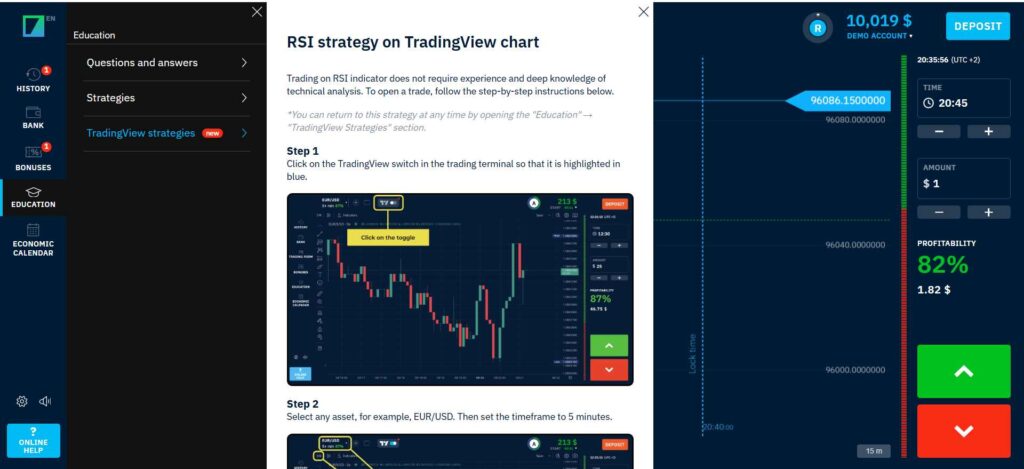
This section provides details about the platform’s educational offerings. Users of the platform can access a comprehensive FAQ section that addresses common questions, ensuring traders have a strong grasp of essential concepts. For those interested in developing their trading strategies, the platform offers various strategy guides, including ones specific to different market conditions.
The use of Trading View strategies is encouraged within the platform, allowing users to incorporate advanced analysis techniques. Practical learning materials are also available in the form of simulations and tutorials, which help traders practice their skills and build confidence.
Additionally, the events calendar is an invaluable resource for users to stay informed about upcoming news and market movements. This calendar helps traders to make timely and informed decisions. Overall, the educational resources aim to equip traders with the necessary tools and knowledge to navigate the platform effectively and enhance their trading proficiency.
Managing Your Account
Engaging with the broker’s platform involves several insightful features for seamless trading. Traders can customize their trading environment by selecting from a diverse range of currency pairs, cryptocurrencies, commodities, indices, and stocks. The ease of toggling these options allows for personalized trading strategies.
A standout feature includes the ability to select between one and multiple graphical views, such as splitting the screen to observe and interact with multiple currency pairs simultaneously. This option enhances the practical convenience of trading on more than one instrument at a time, removing the necessity of multiple monitors.
TradingView quotations integration is another remarkable aspect. Users can compare these with the broker’s own data, ensuring transparency and reliability. This alignment with TradingView provides vital data renowned across various regions, including Europe and America.
Additional features include a comprehensive user menu displaying profile details, easy access to account funding with several methods such as Visa, Mastercard, and various digital wallets. The platform also offers detailed records of trading history, showing both ongoing and past transactions, further enriched by an intuitive display of active transactions’ profitability.
Account management integrates educational elements with a dedicated learning button that includes Q&A sections and strategies, helping users enhance their trading knowledge. Moreover, an integrated events calendar keeps traders informed about upcoming market-moving news, allowing them to strategize accordingly.
The facility to handle bonuses and trading turnovers offers traders incentives but requires careful consideration of terms. Notifications about the market’s hottest deals, potential prizes like high-end gadgets, and signals from top traders contribute to a robust trading experience.
Platform Compatibility
Real-Time Interaction
The platform offers a robust real-time interaction feature, enabling users to communicate promptly and effectively. This feature is essential for traders as it facilitates instant communication, which can be critical in making time-sensitive trading decisions. The platform focuses on delivering a seamless experience, ensuring that users can quickly resolve issues or gain insights through immediate discussion. An intuitive interface supports this functionality, ensuring conversations are straightforward and accessible.
Tailoring Graphs
Users have the ability to tailor their graph displays extensively. Options are available to split the screen into up to four distinct sections, allowing traders to monitor multiple currency pairings concurrently. This enhances the ability to compare and analyze different trading scenarios simultaneously without needing multiple devices. Graph settings are flexible, supporting various time intervals and display styles, making it an attractive feature for traders who value customization and precision in their trading strategies. This functionality is designed to streamline the trading process, promoting a comprehensive view of market trends.